Continuous Integration for Backend APIs
1. Introduction
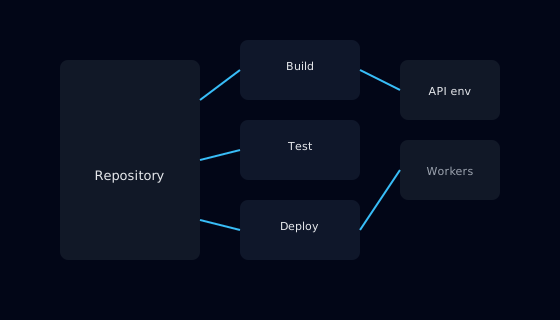
Continuous Integration, often abbreviated as CI, is the practice of automatically building and testing code every time changes are merged. For backend APIs, a well designed CI pipeline is a safety net that catches regressions early and enforces consistent quality standards. Instead of relying on manual checklists, teams encode their expectations as automated checks.
This guide focuses on designing CI pipelines specifically for backend APIs. It does not attempt to cover every feature of CI systems, but concentrates on the steps that have the most impact on reliability: building, testing, static analysis, and packaging artifacts. The goal is to make each change to the API predictable and reversible.
By following these steps, you can gradually move from ad hoc manual testing to a disciplined pipeline that provides fast feedback without blocking development unnecessarily.
2. Who This Guide Is For
This guide is for backend developers, DevOps engineers, and technical leads who want to improve the way API changes are validated. It assumes that you already have a version control system and at least a basic automated test suite, even if it is not yet fully integrated into a pipeline.
Engineering managers can also use this guide to understand what a realistic CI setup for backend services looks like, which helps when planning capacity and setting expectations around delivery speed and quality.
3. Prerequisites
Before implementing the pipeline described here, you should have your API code stored in a shared repository and a process for creating branches and pull requests. You should also have a build script or command that can compile or bundle the application in a reproducible way on a clean machine.
Basic automated tests, such as unit tests or small integration tests that run against an in memory or local database, are strongly recommended. A CI pipeline without tests offers limited value; it may catch compilation errors but will not protect you from subtle behavioral regressions.
4. Step-by-Step Instructions
4.1 Define Pipeline Triggers
Start by deciding when the pipeline should run. A typical configuration runs CI on every pull request and on every merge to the main branch. Running on pull requests gives developers rapid feedback before changes are integrated, while main branch runs serve as a final safety check.
If your repository contains multiple services, you can optimize runtime by detecting which services were affected by a change and triggering targeted pipelines. However, it is often better to start with a simpler global pipeline and refine it later based on real performance data.
4.2 Standardize the Build Stage
The build stage should produce a consistent artifact, such as a compiled binary, a JAR file, or a container image. Use the same commands locally and in CI to avoid subtle differences between environments. If your build currently depends on manual steps, such as editing configuration files, update it so that all required inputs can be provided via environment variables or configuration templates.
Cache dependencies when possible to speed up repeated builds, but verify that cache invalidation is reliable. A broken cache can mask missing dependencies or introduce confusing errors. Most CI systems provide built in mechanisms to cache dependency directories while still running the build in a clean workspace.
4.3 Run Automated Tests
After a successful build, run the automated tests. Start with fast unit tests that verify individual components in isolation. If you have integration tests that spin up a local database or other services, include them as a separate step so that failures are easy to interpret.
For HTTP based APIs, consider adding tests that start the API in a temporary environment and exercise key endpoints. These tests can verify routing, serialization, authentication hooks, and error handling. They provide more realistic coverage than unit tests alone, but should be designed to run within a reasonable time limit.
4.4 Add Static and Contract Checks
In addition to dynamic tests, use static analysis tools to enforce coding standards and detect common issues such as unused variables, unreachable code, or potential null pointer dereferences. While each individual warning may seem minor, together they encourage consistent, maintainable code.
If your API exposes a contract, such as an OpenAPI specification, you can add checks that validate that implementation and documentation remain synchronized. For example, you might ensure that all documented endpoints exist and that response schemas remain compatible with previous versions.
4.5 Publish Artifacts and Reports
At the end of the pipeline, publish artifacts that can be used in later stages, such as deployment pipelines or manual testing. These artifacts might be container images stored in a registry or build archives stored in an artifact repository.
Also publish reports such as test results, coverage summaries, and static analysis findings. Developers should be able to see quickly what failed and why, without digging through raw logs. Clear reporting encourages consistent use of the pipeline and reduces the time spent diagnosing issues.
5. Common Mistakes and How to Avoid Them
A common mistake is making the CI pipeline too slow. If a single run takes longer than a few minutes, developers may avoid running it frequently or feel discouraged from pushing small changes. To address this, prioritize fast tests and use parallelization when the CI platform supports it. Move exhaustive or long running tests to separate nightly or pre release pipelines.
Another mistake is treating CI as a separate system owned solely by operations or a platform team. When developers do not feel responsible for the pipeline, it tends to accumulate brittle workarounds and outdated steps. Involve developers in pipeline design and maintenance so that it reflects real development practices.
A third mistake is letting failing builds become normal. If the main branch frequently shows red builds, the signal loses meaning and real problems may go unnoticed. Establish a culture where a failing build triggers immediate investigation and is treated as a team level responsibility, not an individual inconvenience.
6. Practical Example or Use Case
Imagine a team maintaining an order management API. Before introducing CI, they manually run tests on their laptops and rely on informal agreement not to break the main branch. Occasionally, a rushed change introduces a regression that is only discovered after deployment, causing rollbacks and delays.
After implementing CI, every pull request triggers a pipeline that builds the service, runs unit and integration tests, and validates the OpenAPI specification. Container images built by the pipeline are tagged with the commit hash and stored in a registry. Deployments to test and production environments pull these exact images, ensuring that what was tested is what is deployed.
Over time, the team adds static analysis and coverage reporting. As confidence in the pipeline grows, they shorten manual regression testing, which speeds up delivery while maintaining quality. Incidents caused by untested changes become rare exceptions rather than a recurring pattern.
7. Summary
A well designed continuous integration pipeline is a cornerstone of reliable backend API development. By standardizing how services are built, tested, and packaged, you reduce the risk of regressions and make deployments more predictable.
Starting with clear triggers, a robust build stage, and focused automated tests, then adding static and contract checks, you can create a pipeline that provides fast, meaningful feedback. Publishing artifacts and reports completes the loop, enabling teams to trace each deployment back to its tested source. When integrated into everyday development practices, CI becomes an unobtrusive but powerful ally in maintaining API quality.